
Android App Development in Kotlin
The network layer is the most common source of production failures in any Android app. Expert API and network engineering prevents those failures before they reach your users.
Android app development in Kotlin succeeds or fails at the network layer. Every API call that does not handle authentication expiry, every response that does not map typed errors to the correct UI state, and every cache that serves stale data during a critical user action is a production defect that did not have to exist. NextEnvision engineers the network layer of every Android app development in Kotlin engagement with Retrofit 2, OkHttp interceptors, coroutine-based token refresh, typed error handling, and offline-first caching for agencies in Australia, the United Kingdom and Singapore who need applications that behave correctly when the network does not.
What Network Layer Engineering Covers in Android App Development in Kotlin
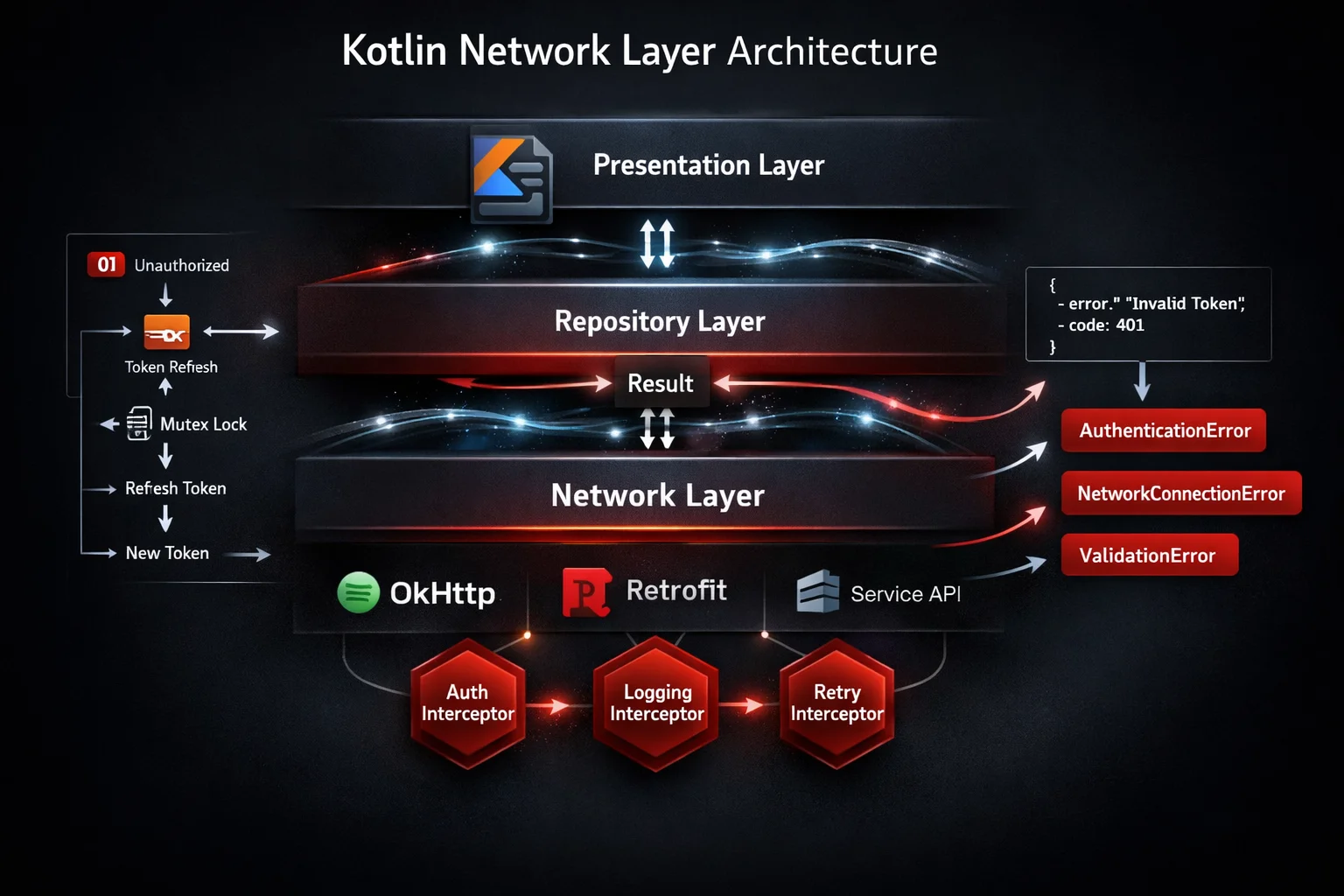
Android app development in Kotlin communicates with backend services through a network layer that sits between the data layer’s repository implementations and the remote API. When this layer is engineered correctly, the rest of the application never needs to know whether the data it received came from the network, a local cache, or the Room database. When it is not, the failure modes propagate upward: crashes from unhandled HTTP errors, blank screens from missing loading states, session expiry errors that log users out instead of silently refreshing their token, and stale data served from an unvalidated cache.
The standard network layer in android app development in Kotlin uses Retrofit 2 as the type-safe HTTP client, OkHttp as the underlying HTTP engine, and OkHttp interceptors to handle cross-cutting concerns including authentication header injection, request logging, and retry logic. Kotlin coroutines replace Retrofit callbacks and RxJava reactive chains with suspend functions that read like synchronous code but execute on background threads.
A well-engineered network layer in android app development in Kotlin maps every possible HTTP response and network exception to a typed domain error before the result leaves the data layer. The ViewModel receives a Kotlin Result type wrapping either a success domain object or a typed domain error, never a raw Retrofit response or a generic IOException. This mapping means the presentation layer can render the correct UI state for every network condition without defensive null checks and exception catches scattered across the codebase.
NextEnvision engineers this network layer for every android app development in Kotlin engagement we deliver for agencies and businesses in Australia, the UK and Singapore. Every engagement includes written documentation of the network layer architecture, the authentication flow, the error taxonomy, and the caching strategy so the client’s future development team can extend the network layer without reverse-engineering the original implementation.
Android App Development in Kotlin: 6 Expert API Engineering Services
Six expert network and API engineering services covering every layer of the Kotlin Android network stack from type-safe HTTP contracts to offline-first caching.
Retrofit 2 and OkHttp Network Layer Setup
The Retrofit 2 and OkHttp configuration in android app development in Kotlin establishes the foundation that every API call in the application builds on. We configure OkHttp with a connection pool, read timeout, write timeout, and connect timeout appropriate to the backend’s performance characteristics.
Retrofit is configured with a Kotlin Coroutines call adapter, a JSON converter using Kotlin Serialization or Gson, and a base URL strategy that supports multiple environments through build variant configuration rather than runtime conditional logic.
The Retrofit service interface is defined as a Kotlin interface with suspend functions for every API endpoint, using Kotlin data classes as request and response bodies. Every interface method is documented with the expected HTTP status codes and the corresponding domain error type for each non-200 response.
OkHttp Interceptors for Auth, Logging, and Retry
OkHttp interceptors are the correct location for cross-cutting concerns in android app development in Kotlin network layer. Authentication header injection belongs in an application interceptor that reads the current access token from the token repository and adds it to every outbound request, rather than in each Retrofit call site.
Logging interceptors using HttpLoggingInterceptor are configured at the DEBUG level for debug builds and disabled entirely for release builds, preventing sensitive request and response bodies from appearing in production logs or being captured by network proxies.
Retry interceptors implement exponential backoff with jitter for transient network failures: a 503 Service Unavailable or a connection timeout is retried up to a configurable maximum with increasing delay between attempts, while a 401 Unauthorized is not retried but instead triggers the token refresh flow.
Coroutine-Based Token Refresh and Session Management
Token refresh in android app development in Kotlin is the most error-prone part of the authentication flow. A naively implemented refresh allows multiple concurrent requests to each attempt a refresh simultaneously when the access token expires, resulting in multiple refresh token consumption and session invalidation.
We implement token refresh using an OkHttp Authenticator combined with a Kotlin Mutex that ensures only one refresh request executes at a time. Concurrent requests that trigger the 401 response wait for the single refresh to complete, then retry with the new access token, without any of them making a redundant refresh call.
The token repository manages access token storage in EncryptedSharedPreferences backed by the Android Keystore, expiry time tracking for proactive refresh before the next request, and a logout flow that clears all stored tokens and cancels all active coroutines in the authenticated user’s scope.
API Error Handling and Kotlin Result Type Mapping
Error handling in android app development in Kotlin requires classifying every network failure into the domain error category it represents before the result leaves the data layer. A 401 Unauthorized after a successful token refresh means the user’s session has been revoked server-side and requires re-authentication. A 422 Unprocessable Entity means the request data failed server-side validation. A 503 Service Unavailable is a transient server error that warrants a retry. Each of these produces a different UI state and a different user message.
We define a sealed class hierarchy in the domain layer covering every error category the application must handle. The Retrofit response adapter maps each HTTP status code and network exception type to the correct sealed class variant before returning a Kotlin Result to the caller. The ViewModel maps each Result variant to the correct UiState sealed class variant for the screen.
This mapping means every error the application can encounter is represented as an explicit type in the domain model, rather than as a generic exception that the ViewModel catches and displays as a generic error message.
GraphQL Integration with Apollo Kotlin
Some android app development in Kotlin projects integrate with GraphQL backends rather than REST APIs. Apollo Kotlin is the type-safe GraphQL client for Android, generating Kotlin data classes from the GraphQL schema and query documents at compile time.
We configure Apollo Kotlin with the backend’s GraphQL schema, write query and mutation documents using the GraphQL query language, and use the generated Kotlin types throughout the data layer. Apollo Kotlin supports coroutines natively, returning Flow for subscriptions and suspend functions for queries and mutations.
Error handling in GraphQL is different from REST: a GraphQL response with HTTP 200 can contain both data and errors in the same response body. We handle partial response scenarios by mapping GraphQL errors to the correct domain error types while still processing any partial data returned alongside the errors.
Offline-First Caching with Room and HTTP Cache
Offline-first android app development in Kotlin uses Room as the single source of truth and the network as a data refresh mechanism rather than the primary data source. The repository emits a Flow from the Room DAO, triggers a background network refresh when the cached data is stale, writes the network response into Room, and lets the DAO Flow emit the updated data automatically.
HTTP-level caching uses OkHttp’s Cache interceptor for responses where the server provides appropriate Cache-Control headers. This reduces redundant network requests for data that changes infrequently, such as reference data, user profile information, and configuration endpoints.
Cache invalidation strategy is documented per endpoint type in the network layer architecture document: write-through invalidation for user-generated content, time-based expiry for reference data, and explicit invalidation for configuration data updated by server-side pushes through FCM data messages.
The Network Architecture Decisions We Document Before Writing Any Android App Development in Kotlin Code
Every android app development in Kotlin engagement at NextEnvision begins with a network layer architecture document produced before the first API call is implemented. This document records four decisions that determine how the entire network layer is structured, and changing them after implementation has begun is expensive.
The first decision is the authentication scheme: OAuth 2.0 with refresh tokens, JWT with short expiry, API key, or mutual TLS. Each scheme requires a different OkHttp Authenticator implementation, a different token storage strategy, and a different session expiry handling approach. The authentication scheme is agreed with the backend team and documented before any Kotlin code is written.
The second decision is the error taxonomy: the complete list of error categories the application must handle, mapped to HTTP status codes and network exception types. This taxonomy determines the sealed class hierarchy in the domain layer and drives the Retrofit response adapter implementation. Defining it upfront prevents the common pattern of generic error handling that is added quickly and never refined into the typed error model the application actually needs.
The third decision is the caching strategy per endpoint category: which endpoints should be cached at the HTTP level, which should be persisted to Room for offline access, which should always be fresh, and what the staleness threshold is for each cached type. The fourth decision is the environment configuration: how base URLs, API keys, and timeout values are configured across debug, staging, and production build variants without runtime conditional logic. Agencies that engage NextEnvision for android app development in Kotlin receive this network architecture document as a transferable project asset at handover, alongside the case studies we publish from comparable projects.

4 Advanced Network Engineering Capabilities in Android App Development in Kotlin
WebSocket and Real-Time Data Streams with Kotlin Flow
Multipart File Upload and Large Payload Handling
Real-time features in android app development in Kotlin use WebSocket connections managed through OkHttp’s WebSocket API, wrapped in a Kotlin Flow that emits incoming messages as typed domain objects and handles reconnection automatically on connection loss.
The WebSocket Flow is implemented as a callbackFlow that converts OkHttp’s callback-based WebSocket listener into a cold Flow that can be collected with the correct lifecycle scope. Connection events, message events, and failure events are all mapped to typed sealed class variants emitted on the Flow.
Automatic reconnection uses exponential backoff with a configurable maximum delay, implemented as a retry operator on the callbackFlow. The reconnection logic distinguishes between a clean close initiated by the server and an unexpected connection failure, applying reconnection only to the latter.
Pagination and Paging 3 Integration for List Data
Multipart requests in android app development in Kotlin handle file uploads and form submissions that combine binary file data with metadata fields in a single HTTP request. Retrofit’s MultipartBody.Part API constructs the multipart request body, with progress reporting implemented through a custom OkHttp RequestBody subclass that calls a progress callback as bytes are written to the request stream.
Large binary responses, such as PDF documents and high-resolution images, are handled through Retrofit’s ResponseBody streaming API rather than loading the entire response into memory. The response body is written to a file in the application’s external files directory using a coroutine-wrapped streaming write that runs on Dispatchers.IO.
We configure OkHttp connection and read timeout values conservatively for file upload and download operations, separate from the standard API timeouts, to prevent spurious timeout failures on slower network connections during large payload transfers.
API Versioning and Environment Configuration Strategy
Paginated list data in android app development in Kotlin uses the Jetpack Paging 3 library to load data in pages from the network and cache pages in Room for offline access. The PagingSource implementation fetches the next page from the Retrofit service and returns it to the Paging 3 runtime, which manages the page buffer and handles scroll-triggered page loads automatically.
The RemoteMediator pattern in Paging 3 combines network pagination with Room caching: the RemoteMediator fetches from the network and writes to Room, and the PagingSource reads from Room. This means the user sees cached pages immediately while fresh data is fetched in the background, without any loading state for pages already in the cache.
We configure the Paging 3 page size, prefetch distance, and max size parameters based on the average item size and the target scroll performance, verified with Macrobenchmark scroll profiling on mid-range devices.
MockWebServer Contract Tests for Every API Endpoint
API versioning in android app development in Kotlin requires a strategy for communicating the API version to the backend and handling version mismatches gracefully. We implement API version as either a request header injected by an OkHttp interceptor or as a URL path segment configured per Retrofit interface, depending on the backend’s versioning scheme.
Environment configuration uses BuildConfig fields populated from Gradle build variant properties, making the base URL, API key, and feature flag values compile-time constants that do not require any runtime conditional logic or BuildConfig.DEBUG checks scattered through the application code.
We document the complete environment configuration in the network architecture document with the exact property names, their expected values per build variant, and the process for rotating API keys in each environment without requiring a new app release for the rotation to take effect.
White Label Android App Development in Kotlin for Agencies
Agencies delivering android app development in Kotlin to clients in Australia and the UK need to know that the network layer will not produce post-delivery failures that reflect on the agency. An authentication interceptor that does not handle token expiry silently produces session errors that users report as crashes. A missing retry mechanism makes the app appear unreliable on mobile networks with intermittent connectivity. These failures are invisible in office Wi-Fi testing and visible to every user in the field.
Our white label android app development in Kotlin includes the complete network engineering deliverable: type-safe Retrofit service interfaces, OkHttp interceptors for authentication and logging, coroutine-based token refresh with mutex-protected concurrent request handling, typed error mapping to domain Result types, and offline-first caching where the project requires it. Every network layer decision is documented in the network architecture document delivered alongside the source code.
The white label arrangement covers the complete android app development in Kotlin engagement under your agency brand. Mutual NDA before any client brief or API specification is shared. All Kotlin source code, network architecture documentation, and Play Store materials delivered under your brand with zero NextEnvision identifiers. Complete IP transfer on project completion. AEST and GMT coverage for Australian and UK agency clients.
See our agency partner programme for structured partnership options available to agencies with recurring Android client work across multiple projects and API integration requirements.

Why the Network Layer Is the Highest-Risk Component in Any Android App Development in Kotlin Project
The network layer in android app development in Kotlin is the component most likely to fail in production under conditions that did not exist during development. Development environments have stable Wi-Fi, responsive staging servers, and pre-authenticated sessions that never expire. Production environments have 4G connections that drop mid-request, backend deployments that return 503 during maintenance windows, and user sessions that expire after 30 minutes of inactivity. Every difference between these two environments is a potential production failure that a network layer with no error handling will not recover from.
The most common post-launch failures in android app development in Kotlin that trace to network layer problems are: session expiry crashes, where the app throws an unhandled 401 instead of silently refreshing the access token; empty screens with no error message, where a network timeout is not mapped to a visible UI state; and data corruption, where a partial network response is written to the Room database without validation, corrupting the local cache for subsequent offline sessions.
Each of these failures has a predictable fix that should have been in the original android app development in Kotlin specification: a token refresh Authenticator for session expiry, a typed error mapping for timeouts, and a database transaction wrapper for cache writes. These are not advanced features. They are standard network layer engineering practices that are consistently omitted when the network layer is treated as a configuration task rather than an engineering discipline.
NextEnvision treats the network layer as a primary engineering concern in every android app development in Kotlin engagement, not a boilerplate step completed in sprint one and never revisited. Network layer architecture is reviewed in every sprint that adds a new API integration, updated in the network architecture document when the authentication scheme changes, and tested with MockWebServer contract tests for every new endpoint added to the Retrofit service interface.
Android App Development in Kotlin: Engagement Models by API Integration Complexity
Greenfield Android App Development in Kotlin with Full Network Architecture
Network Layer Audit for Existing Kotlin Android Applications
A complete android app development in Kotlin engagement from requirements through Play Store delivery with the network architecture document produced in sprint zero. Covers Retrofit and OkHttp configuration, authentication interceptor and token refresh implementation, typed error taxonomy definition, offline-first caching strategy, and environment configuration. Every API endpoint is covered by a MockWebServer contract test. The network architecture document is delivered as part of the project handover package.
Suited to agencies delivering android app development in Kotlin for clients whose applications integrate with REST or GraphQL backends and require reliable authentication, offline capability, or complex error handling behaviour.
Third-Party API Integration Sprint
An existing android app development in Kotlin codebase assessed against network layer best practices. The audit covers: OkHttp and Retrofit configuration review, authentication interceptor correctness and token refresh implementation, error handling completeness across every Retrofit endpoint, cache implementation and invalidation strategy, environment configuration review for hardcoded values, and MockWebServer test coverage of the existing API surface. The written audit report ranks findings by risk severity with effort estimates before any remediation work begins.
Dedicated Kotlin Network Engineer
A targeted android app development in Kotlin engagement adding integration with a specific third-party API: a payment gateway such as Stripe, a mapping service such as Google Maps Platform, a communications API such as Twilio, or a custom enterprise backend. The sprint begins with the API specification review and authentication scheme documentation, implements the Retrofit service interface, OkHttp configuration, typed error handling, and any required data transformation in the repository, and delivers MockWebServer contract tests for the complete API surface of the integration.
Network Layer Maintenance Retainer
A structured monthly retainer covering OkHttp and Retrofit library version updates, authentication scheme migration when backend teams rotate credentials or upgrade OAuth configurations, API version migration when backend teams deprecate endpoints, MockWebServer contract test maintenance as API responses evolve, and response format changes that require data class updates in the Kotlin model layer. Contact us via the contact page to discuss retainer options for agencies with multiple active Kotlin Android client integrations.
How Network Engineering Is Applied Throughout Android App Development in Kotlin
Sprint Zero: Network Architecture Document and API Specification Review
Sprint One: OkHttp, Retrofit, and Authentication Interceptor Setup
Before the first API call is implemented in android app development in Kotlin, the network architecture document is written. It records the authentication scheme and token storage strategy, the error taxonomy mapping HTTP status codes to domain error sealed class variants, the caching strategy per endpoint category, the environment configuration approach, and the timeout values per request category. The backend team reviews and approves this document before any Kotlin network code is written, preventing misalignment between client and server error handling assumptions that is expensive to correct after both sides have been implemented.
Feature Sprints: New Endpoints and Contract Tests Delivered Together
In sprint one of android app development in Kotlin, the OkHttp client is built with the agreed timeout configuration, the logging interceptor configured for debug builds, and the authentication interceptor and token refresh Authenticator implemented and tested with a MockWebServer that returns a 401 followed by a successful refresh response. The Retrofit instance is configured with the Kotlin Coroutines call adapter and the JSON converter. The base URL build variant configuration is verified for all three environments: debug, staging, and production. No feature API call is implemented until this foundation is complete and passing its contract tests.
Integration Points: Third-Party API and Payment Gateway Integration
Every new API endpoint added during feature sprints in android app development in Kotlin is delivered with a corresponding MockWebServer contract test covering the success response, every documented error response, a timeout simulation, and a malformed response simulation. This ensures the error mapping layer handles every edge case the endpoint can produce, not only the happy path. New endpoints that require changes to the authentication flow, the error taxonomy, or the caching strategy trigger an update to the network architecture document in the same sprint.
Pre-Delivery: Full API Surface Coverage and Environment Verification
Third-party API integrations in android app development in Kotlin, such as payment gateways, mapping services, and push notification providers, are implemented as separate OkHttp client instances where the third-party API requires different authentication, timeout, or retry configuration from the application’s primary backend. This prevents third-party configuration requirements from contaminating the primary client configuration and makes each integration independently replaceable without affecting other network layer components.
Pre-Submission: Network Layer Review and Security Verification
Before Play Store submission, the complete API surface of the android app development in Kotlin project is reviewed against the MockWebServer contract test suite to confirm full coverage. The production OkHttp configuration is verified against the staging configuration to confirm that logging is disabled, the production base URL is correctly applied across all build configurations, and certificate pinning is active for the production API domain. A network proxy test confirms that the release build’s API traffic cannot be intercepted by a MITM proxy, verifying that OkHttp certificate pinning is correctly applied to the production certificate chain. Visit our mobile app development page for the full scope of our Kotlin Android delivery services.
Post-Launch: API Evolution and Network Layer Maintenance
After Play Store launch, the network layer in android app development in Kotlin requires ongoing maintenance as the backend API evolves. New endpoints are added to the Retrofit service interface with corresponding contract tests. Deprecated endpoints are identified from backend changelog notifications and removed from the application before the backend removes them. API credential rotations are applied to the build configuration without requiring source code changes. OkHttp and Retrofit version updates are applied and tested against the full MockWebServer contract test suite before merging to the main branch. Network failures reported through Firebase Crashlytics are traced to their OkHttp interceptor origin and fixed in the next release cycle.
Android App Development in Kotlin: API and Network Engineering FAQs
Common questions about Retrofit, OkHttp, token refresh, error handling, GraphQL, and offline caching in android app development in Kotlin.
How is Retrofit configured for android app development in Kotlin?
Retrofit in android app development in Kotlin is configured as a singleton instance provided through a Hilt NetworkModule at SingletonComponent scope. The configuration includes an OkHttp client built with connection pool settings, timeout values, and all required interceptors. A Kotlin Coroutines call adapter replaces the default Call adapter so Retrofit service methods can be declared as suspend functions. A JSON converter using Kotlin Serialization or Moshi maps request and response bodies to and from Kotlin data classes. The base URL is provided through a BuildConfig field populated from the Gradle build variant configuration, so the correct API endpoint is selected at compile time for each build type without any runtime conditional logic.
How does token refresh work in android app development in Kotlin?
Token refresh in android app development in Kotlin is implemented using OkHttp’s Authenticator interface, which is called automatically when an HTTP response has a 401 Unauthorized status code. The Authenticator implementation calls the refresh token endpoint on a separate OkHttp client instance that does not have the authentication interceptor, preventing infinite refresh loops. A Kotlin Mutex prevents multiple concurrent requests from each attempting a refresh simultaneously when the access token expires, ensuring only one refresh request executes while other requests wait and then retry with the new access token. The refreshed access token is stored in EncryptedSharedPreferences backed by the Android Keystore and made available to the authentication interceptor for subsequent requests.
How are HTTP errors handled in android app development in Kotlin?
HTTP error handling in android app development in Kotlin maps every non-success response to a typed domain error before the result leaves the data layer. A Retrofit response adapter wraps the call in a try-catch block and maps each HTTP status code to the corresponding domain error sealed class variant: 400 Bad Request maps to a ValidationError, 401 Unauthorized to an AuthenticationError, 403 Forbidden to an AuthorisationError, 404 Not Found to a NotFoundError, 422 Unprocessable Entity to a ValidationError with the server’s error body, 503 Service Unavailable to a ServerUnavailableError, and network exceptions to a NetworkConnectionError. Repository methods return Kotlin Result types wrapping either the success domain object or the typed domain error, never throwing exceptions to their callers.
What is the difference between REST and GraphQL in android app development in Kotlin?
REST in android app development in Kotlin uses Retrofit with a Kotlin service interface where each method maps to an HTTP endpoint. The response type is a Kotlin data class that maps to the JSON response body. Error handling uses HTTP status codes. GraphQL uses Apollo Kotlin, which generates Kotlin data classes from the GraphQL schema and query documents at compile time, providing type safety for every field in every query response. GraphQL errors are embedded in the response body alongside data rather than expressed through HTTP status codes, requiring a different error handling approach that processes both the data and errors fields of every response. GraphQL subscriptions provide real-time data updates through a WebSocket connection managed by Apollo’s subscription API.
Do you offer white label android app development in Kotlin with network engineering for agencies?
Yes. Our complete android app development in Kotlin capability, including full network layer engineering with Retrofit and OkHttp configuration, coroutine-based token refresh, typed error handling, offline caching, and MockWebServer contract tests, is available as a white label engagement for digital agencies in Australia, the UK and Singapore. We sign a mutual NDA before any client brief or API specification is shared, deliver all Kotlin source code and network architecture documentation under your brand with zero NextEnvision identifiers, and transfer complete IP ownership on project completion. Engineers cover AEST and GMT business hours. See our white label development and agency partner programme pages for full details.
How do you test the network layer in android app development in Kotlin?
Network layer testing in android app development in Kotlin uses MockWebServer, an OkHttp library that runs a real HTTP server on localhost during the test, serving scripted responses from an in-memory queue. The Retrofit client under test is configured with the MockWebServer’s local URL instead of the production base URL. Each test enqueues the responses the server should return, executes the repository method under test, and asserts that the repository returned the correct Kotlin Result type. MockWebServer also records every request it receives, allowing assertions on the request body, headers, and path for requests that are expected to include specific authentication headers or request body fields. Contract tests cover the success response, every documented error response, a simulated timeout, and a malformed JSON response for every Retrofit service interface method.